AI-native IDE
AI writes the code. You stay in control.
The AI-native IDE where the agent always knows where it is in your system — and you always see what it's doing. We don't make the model smarter. We make it unable to break what it can't see — by building a live model of your architecture and writing inside it.
tot
For developers
Structural visualization, AI chat with project context, agent pipelines, constitution, security vault, wiki. The full editor for individual developers.
Explore features ↓tot-space
For teams
Shared workspace, real-time presence, co-editing, lens-based review, team chat, role-based access, and shared constitution.
Learn more →tot-enterprise
For companies
AI governance, cost controls, project portfolios with inherited constitution, cross-project contract monitoring, audit & compliance.
Learn more →Review what AI builds. Control how it works.
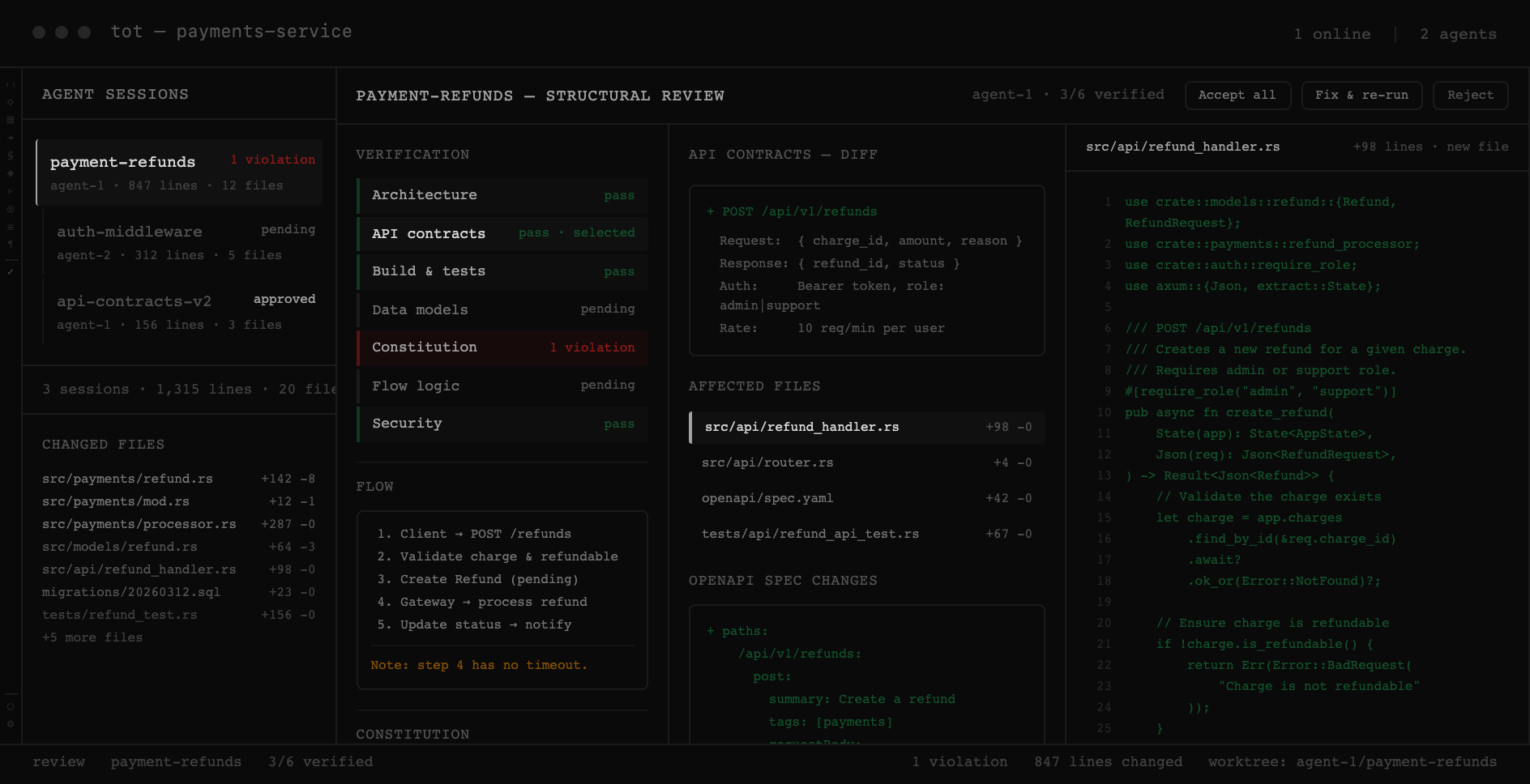
Agents produce hundreds of changes per session. tot lets you verify every one — through architecture diffs, data model impact, flow analysis, and constitution compliance. Not just a flat diff, but structural understanding of what actually changed.
Positioning
We don't race for a smarter model. We make the one you use unable to break what it can't see.
AI code editors added a chat to VS Code and called it a revolution. They still think in files. tot thinks in projects.
AI Code Editors
- × File-level autocomplete with an LLM sidebar
- × No understanding of architecture, data models, or flows
- × Agent writes code — you review a flat diff
- × No governance: anyone pushes anything
- × Single-player tool adapted for teams as an afterthought
tot — Architecture-first
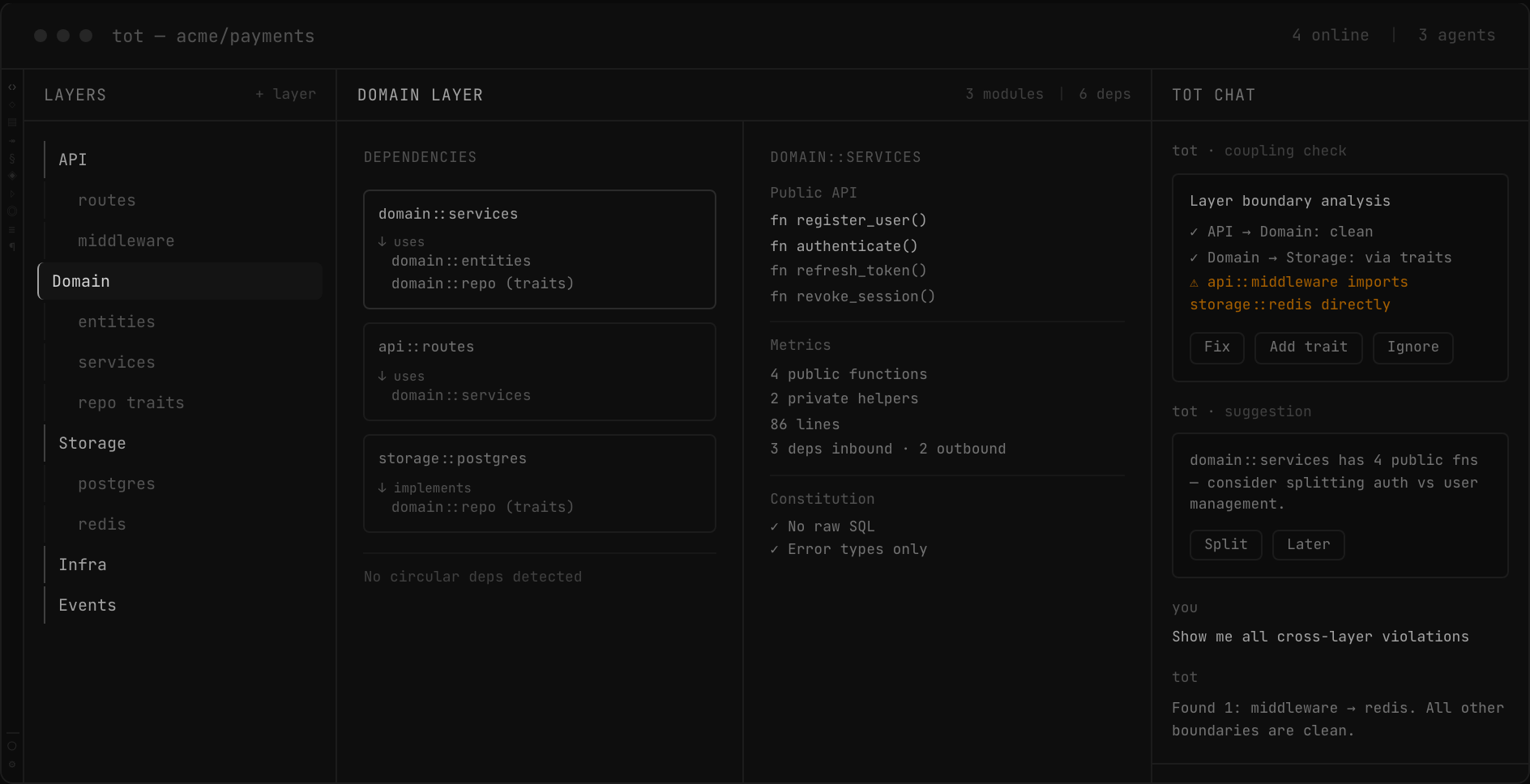
- ✓ Structural visualization of the whole project: architecture, data models, flows, security
- ✓ Project-level context for every AI interaction
- ✓ Visual diffs: see what changed in architecture, not just in files
- ✓ Project constitution: rules that agents and humans must follow
- ✓ Team-first: shared context, lens-based reviews, real-time coordination
AI code editors help you write code faster. tot helps you understand and govern what AI writes — at the project level, across the whole team.
Context
Nobody is holding the architecture.
AI writes most of the code now — file by file, with no persistent picture of the system. Architectural drift is the failure class that grows fastest in AI-generated code (+153% vs human), and it compounds before anyone catches it in review.
Today
Agents write, you scroll
Agent produces 1,500 lines. You see a diff. No structural view, no intent verification, no way to understand what actually changed at the project level.
Today
Editor knows files, not architecture
Your editor sees syntax. It doesn't know your module boundaries, your data flow, your project conventions. It can't tell you if an agent broke the architecture.
Today
No team coordination
Three developers, three agents, same codebase. No shared context, no visibility, no constitution. Conflicts surface at merge time.
Capabilities
An editor built around how projects actually work.
01 — Understand
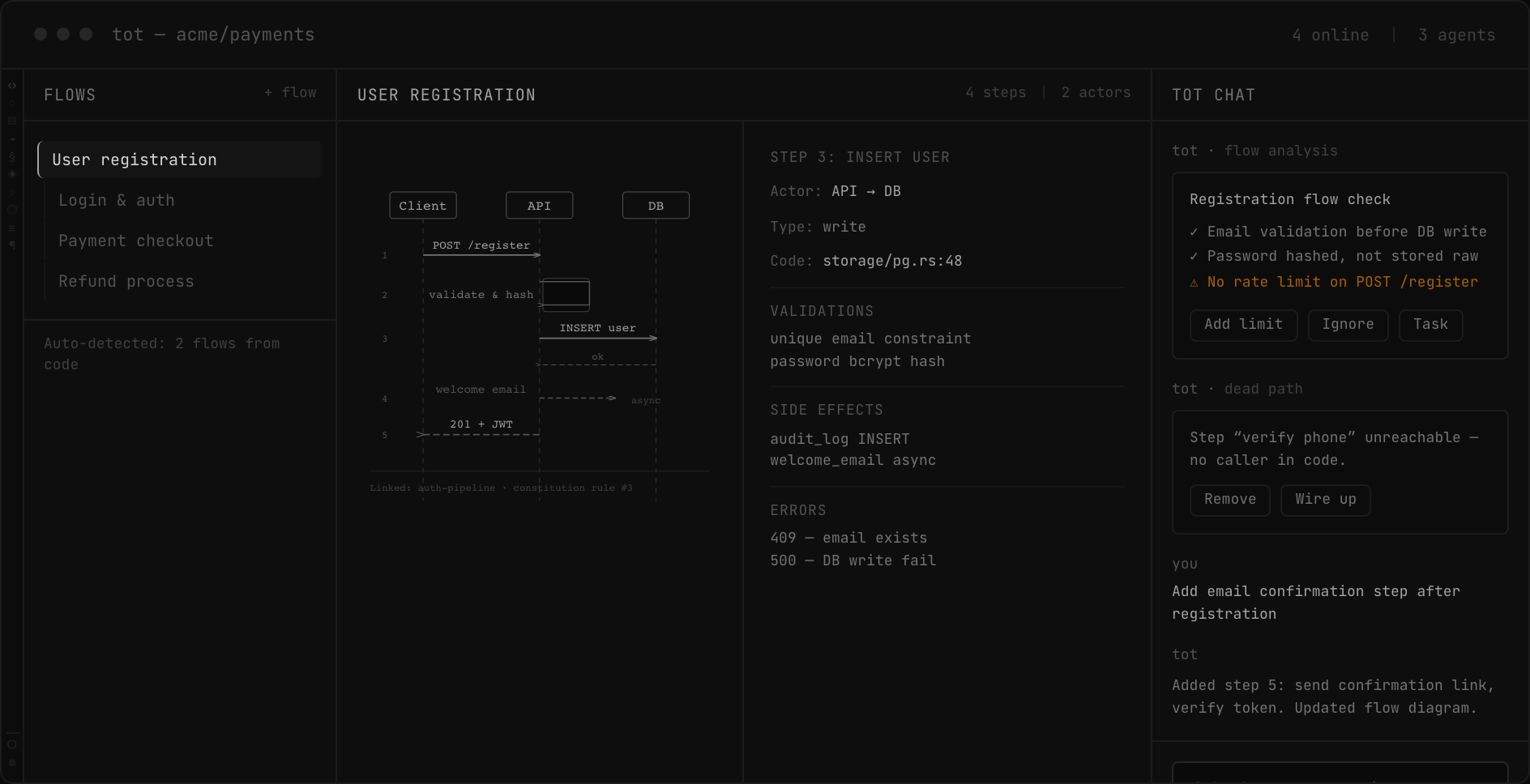
Structural visualization
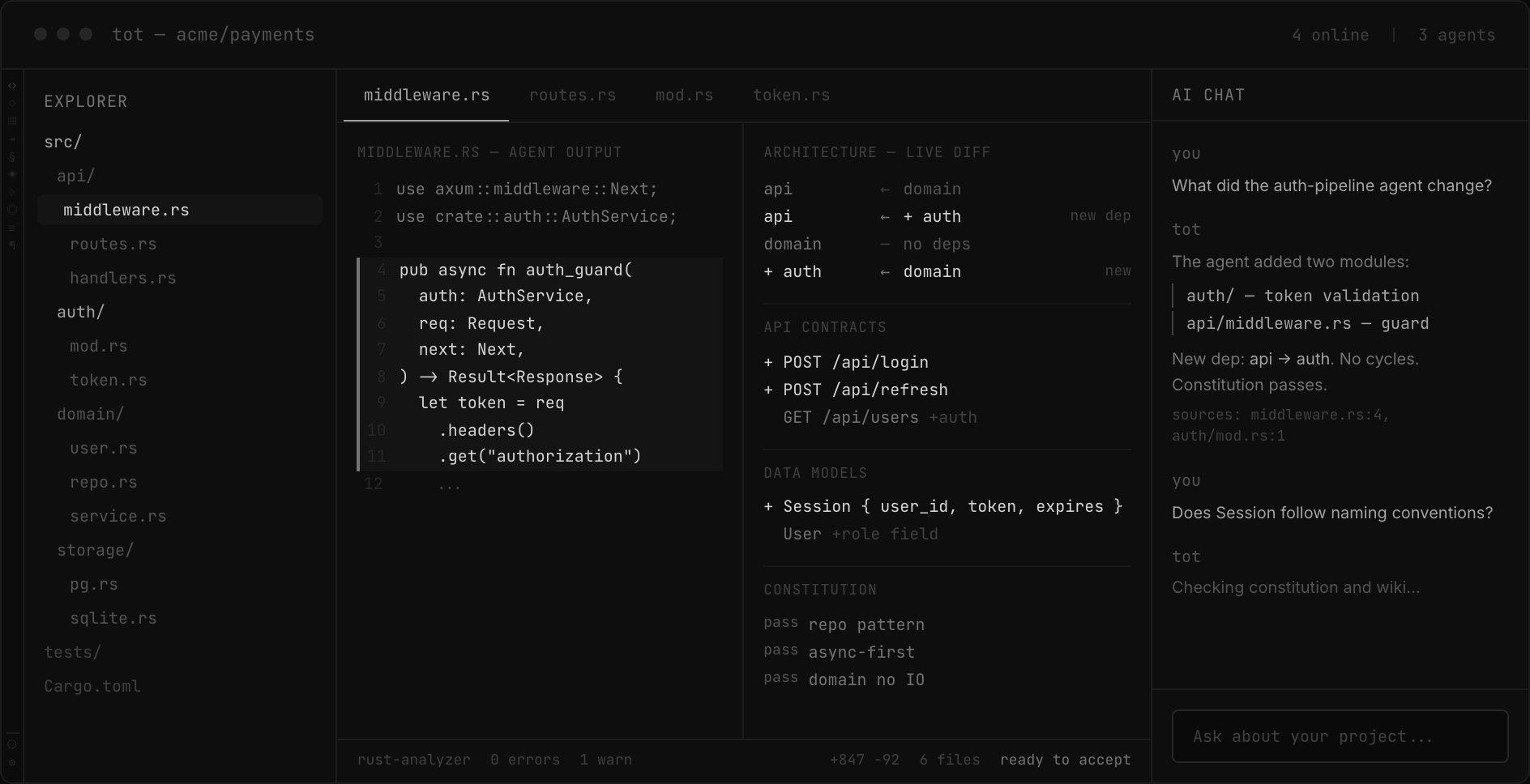
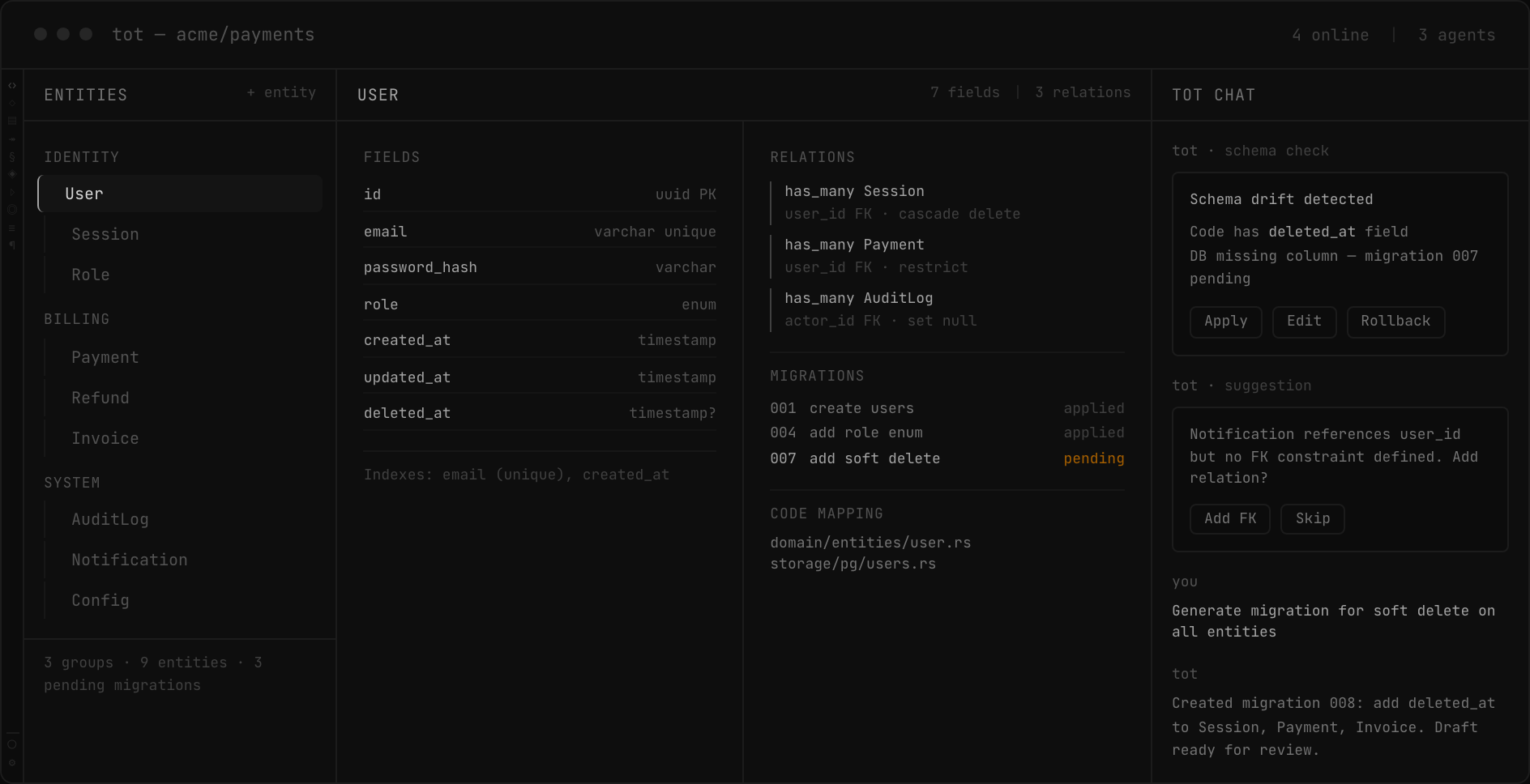
tot parses your codebase with tree-sitter and LSP, then builds structural views of your project. Not just files — architecture, data models, API contracts, algorithms, features, tasks from code comments, and project constitution. All updated incrementally in under a second.
- Incremental analysis with file watcher (<1s updates)
- Cross-reference intelligence and impact analysis
- Supports Rust, TypeScript, Go, Python, Java, JS
02 — Ask
AI chat with project context
Ask questions about your codebase and get answers grounded in real code. tot injects architecture, constitution, and relevant code chunks into every query via RAG. Source attribution shows exactly where answers come from.
- RAG-powered semantic search across codebase
- Auto-injected constitution and architecture context
- Clickable source references, persisted conversations
03 — Orchestrate
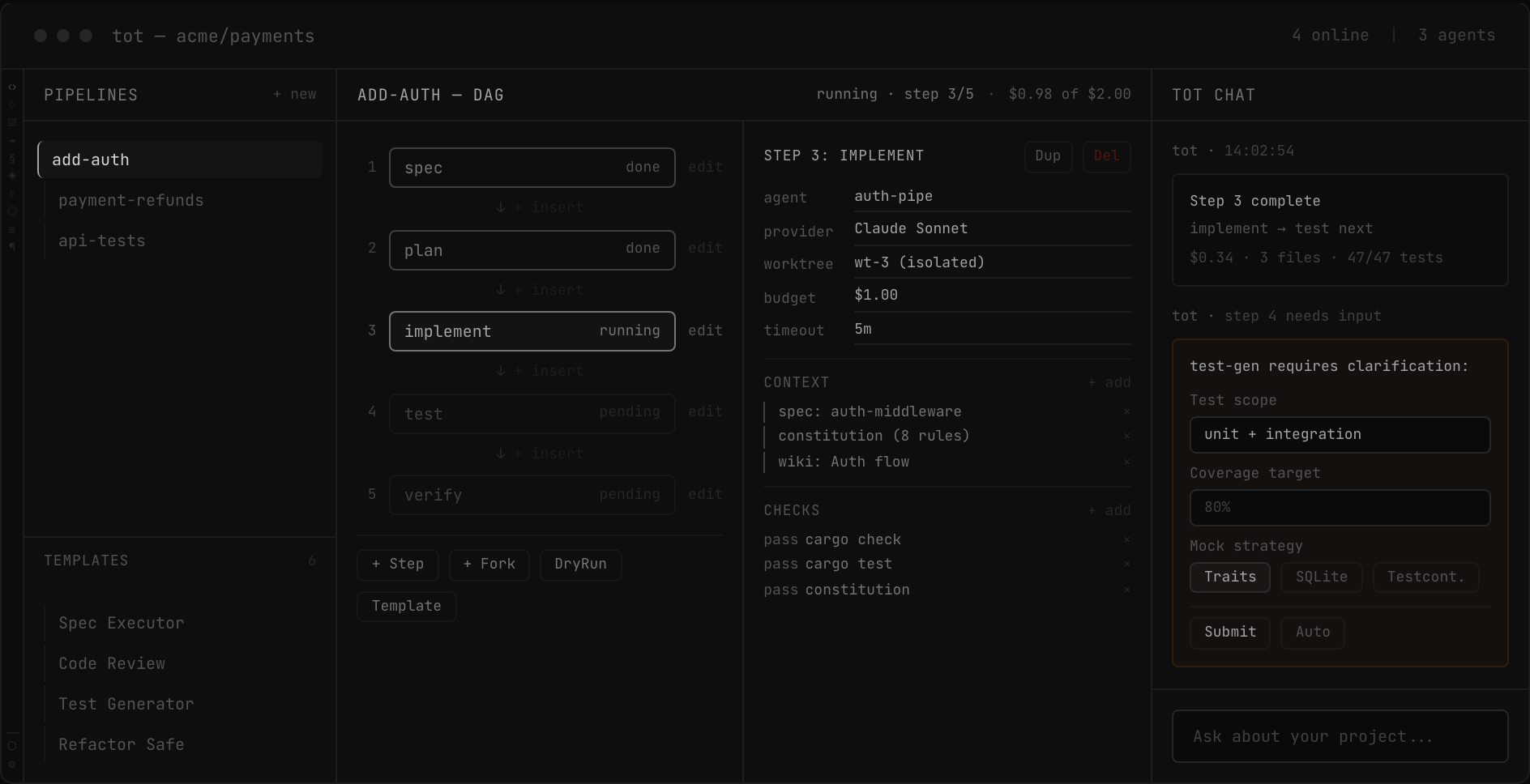
Agent pipelines
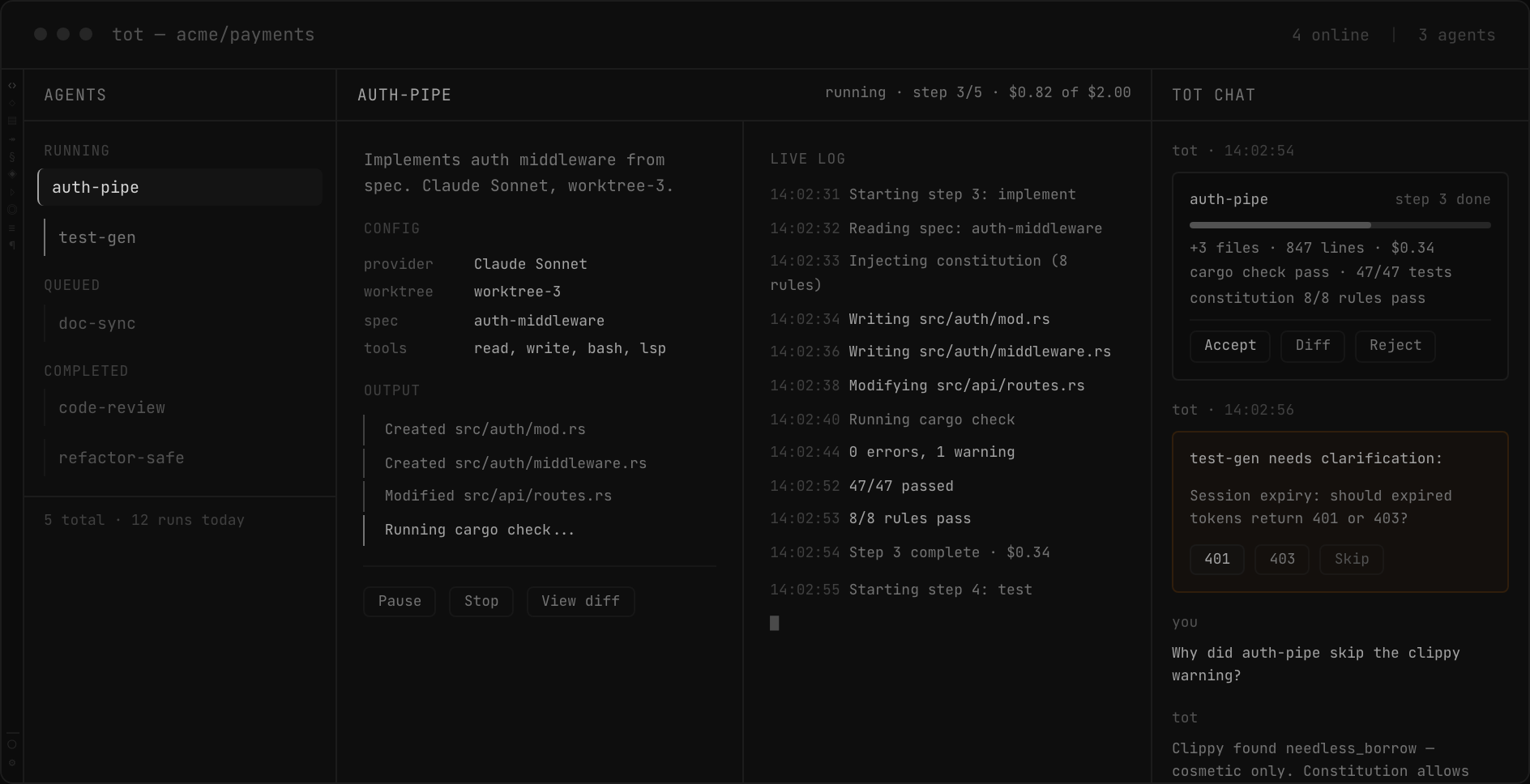
Define multi-step pipelines that spec, plan, implement, test, and verify. Visual DAG editor with built-in templates. Each step runs in an isolated git worktree so parallel agents can't conflict. DryRun, step-by-step debugging, breakpoints, replay from any step.
- Multi-provider: Claude, GPT, Gemini, Ollama
- Git worktree isolation for parallel execution
- Built-in templates: Spec Executor, Code Review, Test Generator
- Per-step budget limits with pause at 80%
04 — Verify
LSP analysis, visual diffs, build & test
After each agent session, tot runs the language server, renders architecture and flow diffs, and executes build and test commands. Verification loop: if cargo check fails, the agent fixes it automatically. Visual diffs show structural and behavioral changes at the right level of abstraction.
- Type checking, broken references, dead code
- Architecture diff and flow diff (before/after)
- cargo check/test/clippy with auto-fix loop
- Delta views: entity-level changes, not line diffs
05 — Govern
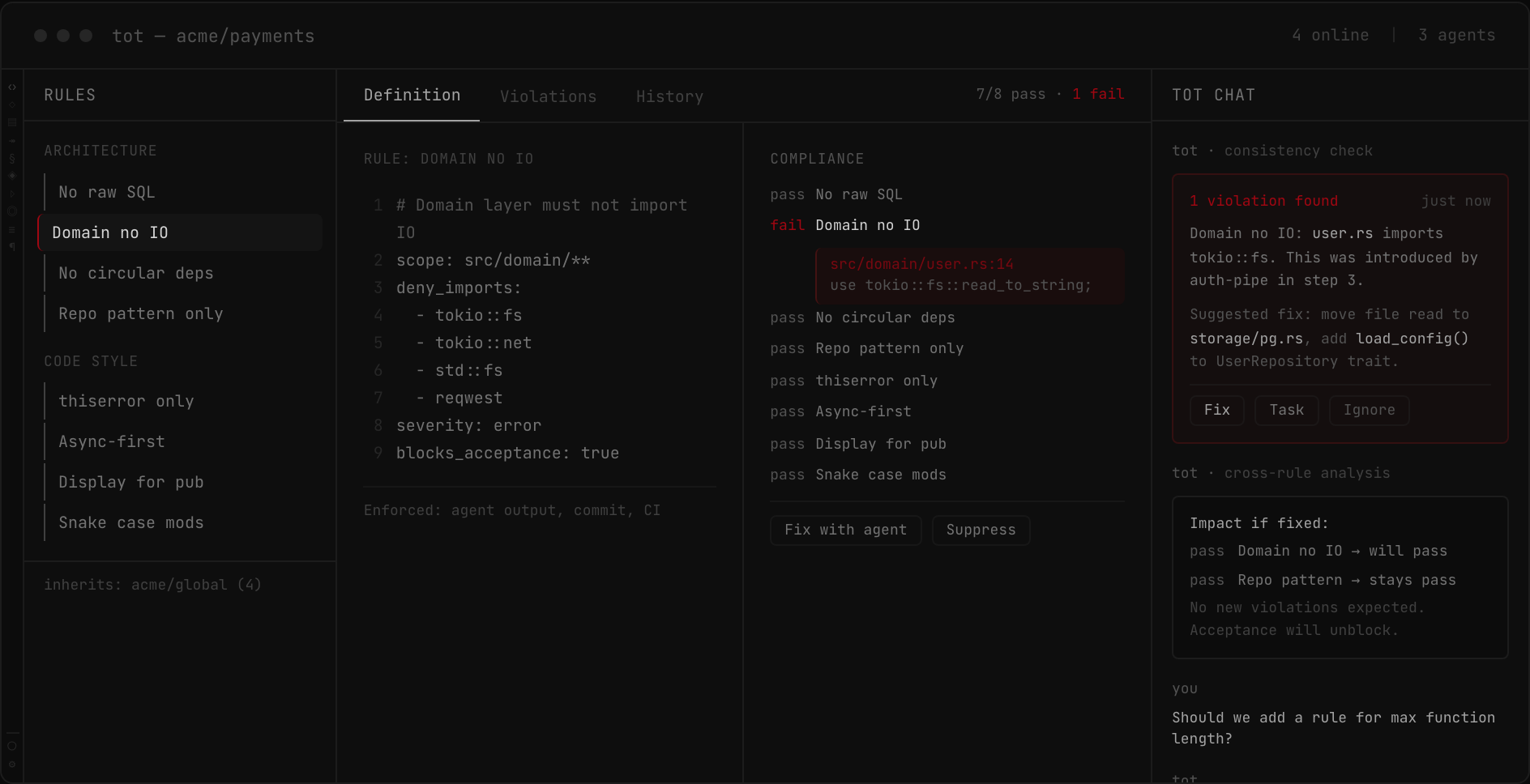
Project constitution
Define your project's rules once: architectural constraints, naming conventions, dependency boundaries. The constitution is injected into every agent prompt and checked on every commit. Violations block acceptance automatically.
- Injected into agent system prompts via RAG
- Enforced on agents and humans alike
- Team-shared with sub-project inheritance
06 — Manage
Features, specs, and roadmap
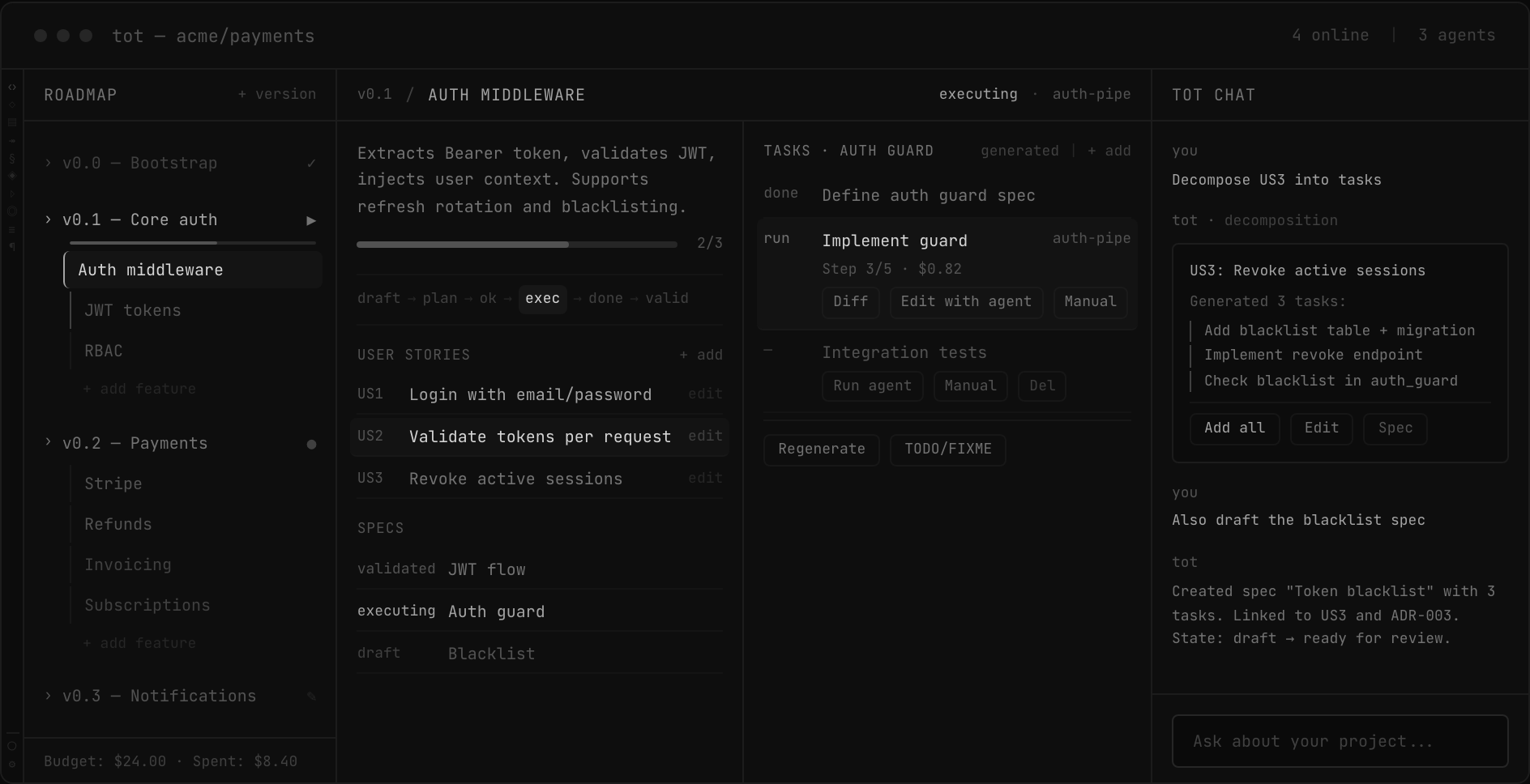
Specs, features, user stories, and tasks live inside the editor next to the code they affect. A spec follows a structured lifecycle: Draft → Planning → Approved → Executing → Done → Validated. AI decomposes specs into tasks, each task can trigger an agent pipeline.
- Structured spec workflow with state machine
- Tasks linked to code, modules, and pipelines
- Features, requirements, and roadmap tracking
07 — Document
Project wiki
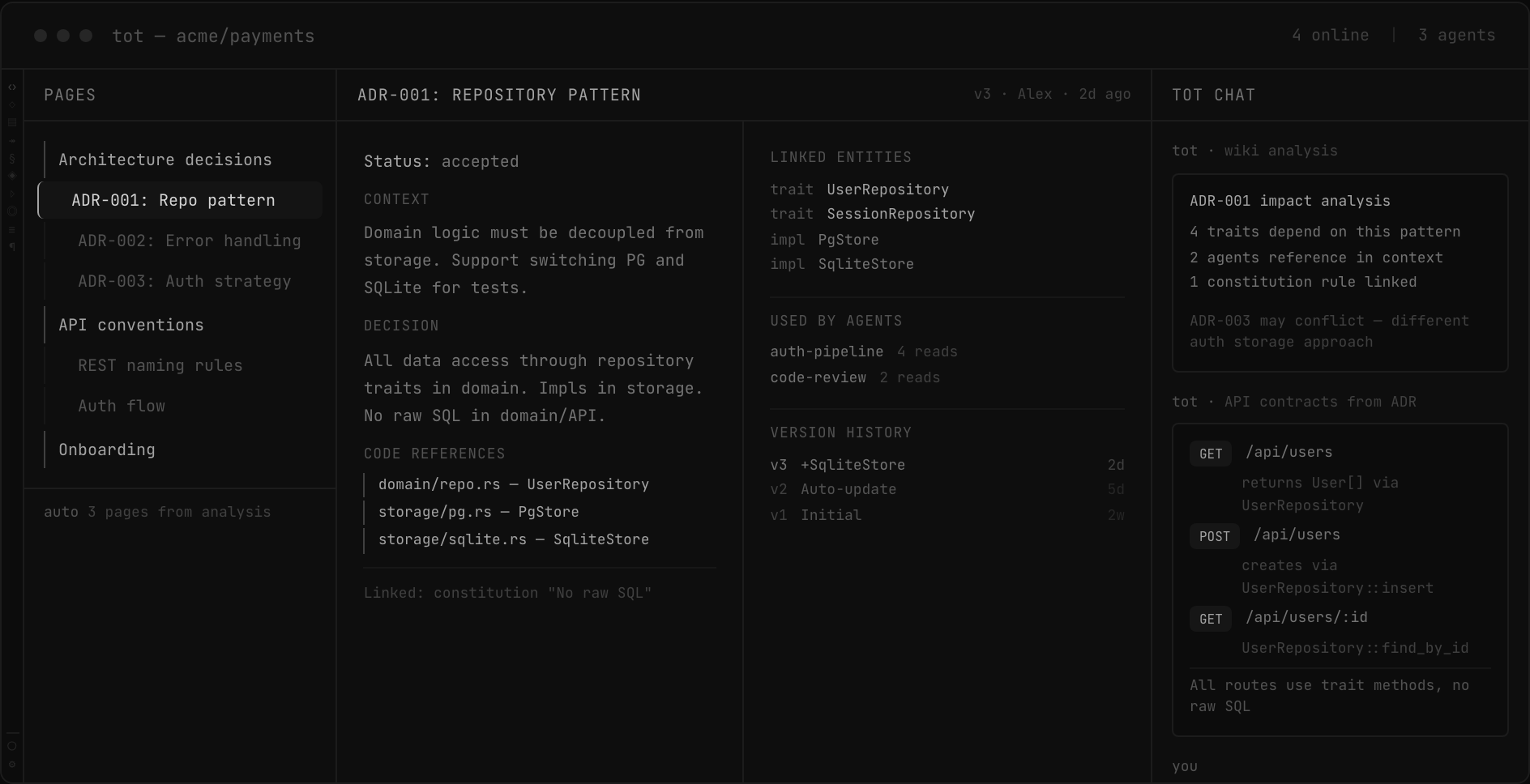
Architecture decisions, API conventions, onboarding guides. Living documentation with cross-references to code. Agents use wiki as context for tasks. Auto-generated summaries from code analysis keep documentation in sync with reality.
- Internal doc entities with version tracking
- Agents use wiki pages as context via RAG
- Auto-generated from code analysis
Workflow
How a task flows through tot.
01
Define
Write a spec or describe the task. tot parses it into structured requirements.
02
Plan
AI architect identifies affected modules, maps dependencies, generates tasks.
03
Execute
Agents implement, test, and document. Tracked in real-time with cost monitoring.
04
Verify
LSP analysis, architecture diffs, flow diffs, constitution check. Automated.
05
Accept
All checks pass — accept with one click. Violations — blocked until resolved.
Details
Also included.
Pipeline templates
Spec Executor, Code Review, TODO Hunter, Test Generator, Refactor Safe, Doc Generator. Built-in and custom.
Pipeline debugging
DryRun mode, step-by-step execution, breakpoints, replay from failed step. Pre/post analysis snapshots.
Git worktree isolation
Parallel pipeline steps run in isolated worktrees. Three-way merge with conflict resolution UI.
Cross-reference intelligence
Impact analysis across all entities. "What breaks if I change User?" Transitive dependency graph.
Budget enforcement
Per-spec, per-step cost limits. Pause at 80%, error at 100%. Cost history and spending trends.
Build & test loop
cargo check/test/clippy with JSON diagnostics. Verification loop: write, check, fix, test, fix.
Crash recovery
Event log replay with CRC32 checksums. Orphaned worktree cleanup. Retention policies.
Incremental analysis
File watcher with content-hash change detection. 1000 files in <10s, incremental updates in <1s.
Code discussions
Inline discussions anchored to file:line:commit. Create task or ask agent from any discussion.
Spec workflow
Structured lifecycle: Draft, Planning, Approved, Executing, Done, Validated. AI planning with tool use.
Multi-provider
Claude, GPT, Gemini, Ollama, OpenRouter, Azure, Bedrock. Per-agent provider and model override.
MCP integrations
Model Context Protocol for tool integration. GitHub, CI/CD, Slack, databases, custom MCP servers.
Security
Your secrets never leave your machine.
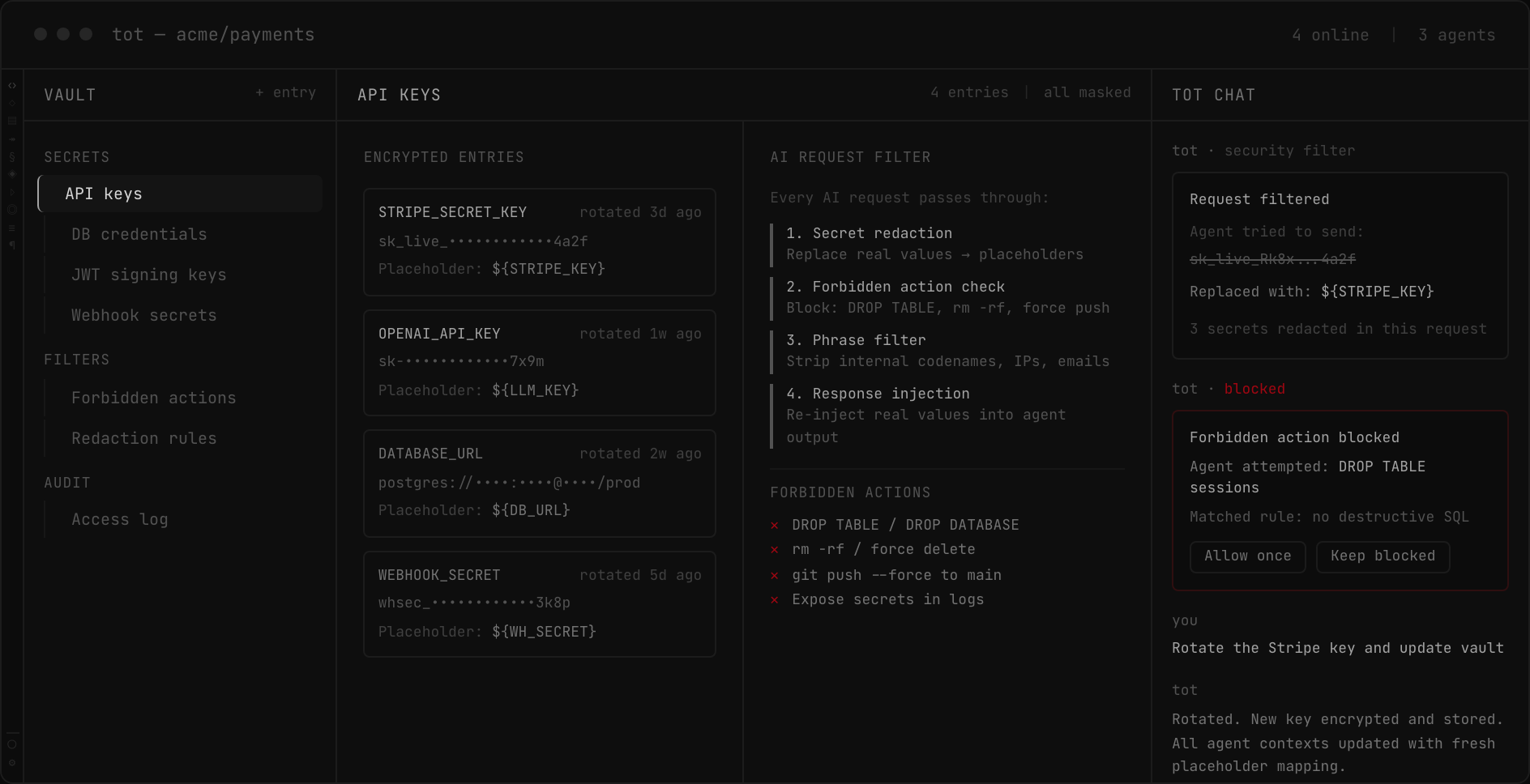
tot has a built-in encrypted vault and AI request filter. Secrets are redacted before any data reaches an AI provider — and re-injected locally when the agent output returns.
DB credentials, tokens
${STRIPE_KEY}
${DB_URL}
real values again
Encrypted vault
AES-256 encrypted storage for API keys, credentials, tokens, and connection strings. Organized by category. Rotation tracking and expiry alerts.
Placeholder substitution
Every AI request is scanned against the vault. Real values are replaced with safe placeholders before leaving your machine. Re-injected on return.
Forbidden actions
Define actions agents must never take: DROP TABLE, force push, delete production data. Blocked before execution with an audit trail.
Phrase redaction
Strip internal codenames, employee emails, IP addresses, and any custom patterns from AI context. Configurable regex rules per project.
Audit log
Every secret access, substitution, blocked action, and redaction is logged locally. Filterable by time, user, agent, and action type.
Zero-trust by default
Vault never synced to cloud. No secret touches the network unencrypted. Agent output validated before applying changes to your codebase.
Comparison
Editors that assist vs. an editor that understands.
| Capability | tot | Cursor | Copilot | Devin |
|---|---|---|---|---|
| Structural visualization | ✓ | — | — | — |
| AI chat with project RAG | ✓ | ~ | ~ | ~ |
| Visual diffs (arch, flow, data) | ✓ | — | — | — |
| LSP-based post-agent verification | ✓ | — | — | — |
| Project constitution | ✓ | — | — | — |
| Cross-reference impact analysis | ✓ | — | — | — |
| Agent pipelines with DAG editor | ✓ | — | — | ~ |
| Git worktree isolation | ✓ | — | — | — |
| Spec-driven task management | ✓ | — | — | ~ |
| Built-in project wiki | ✓ | — | — | — |
| Build/test verification loop | ✓ | — | — | ✓ |
| Budget & cost governance | ✓ | — | — | ✓ |
| Team workspace & RBAC | ✓ | ~ | ~ | — |
| Multi-provider AI | ✓ | — | — | — |
Pricing
Free while in development.
tot is in active research & development. During this phase all features are available for free. Pricing will be announced closer to the public release.
Solo
Free
forever
Full editor with structural visualization, agents, and pipelines for individual developers.
- Structural visualization
- Unlimited projects
- Agents & pipelines
- Local storage
Team
Free
during development
Shared workspace, real-time collaboration, team constitution, and role-based access.
- Everything in Solo
- Shared workspace
- Role-based access
- Team constitution
Enterprise
Coming later
pricing TBD
On-premise deployment, SSO, compliance, and dedicated support.
- Everything in Team
- Cloud or on-premise
- SSO & SAML
- Audit logs
Early access
Request access.
tot is in active development. Leave your email to get early access and shape the product.
No spam. Only launch updates.